
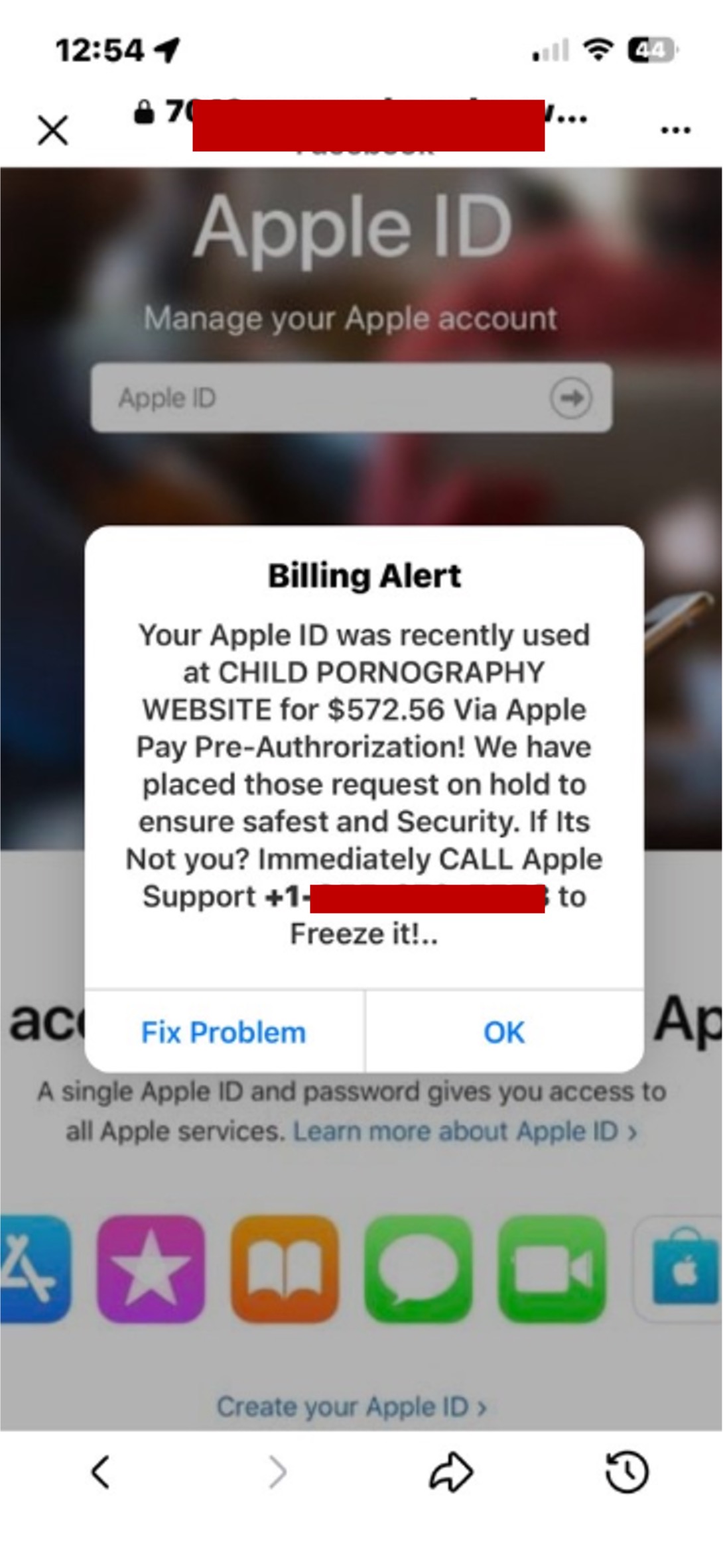
You’re scrolling on Facebook, and you encounter links either via an ad, a shared post, a compromised page, or a direct message. Clicking one of the links opens in Facebook’s in-app browser. Then a popup fills the screen. It’s labelled a “Billing Alert” and it claims your Apple ID was used to make a payment to a child pornography website. It tells you to call Apple Support immediately to freeze the charge.
How the scam works
1. A fake Apple ID billing alert accuses you of something you didn’t do
This is a vishing scam, where someone impersonates a trusted brand to manipulate and deceive someone over the phone.
When you open a questionable link on Facebook, you will see a page that replicates Apple’s account management interface: the Apple logo, gradient background, app icons, and “Manage your Apple account” header. Then a popup appears immediately, formatted as an official billing alert, with a specific dollar amount ($572.56), a reference to illegal content involving child exploitation, and a phone number to call. Both buttons (“Fix Problem” and “OK”) lead to the same place: the phone number on the alert.
The accusation is a calculated choice. Being associated with that kind of content is terrifying and deeply shameful, and that combination makes people reluctant to show the popup to anyone who might help them think clearly. The shame is the mechanism, not a side effect.
2. The phone call asks for your Apple ID credentials and verification code
When you call, a live criminal operator answers posing as Apple Support. They’ll ask you for personal details to verify your identity, such as your Apple ID credentials or a verification code that just arrived on your phone. That code is a real two-factor authentication code the scammer is using to break into your account while you’re still on the call.
3. The scammer uses your credentials to break into your account
Once they have your credentials or verification code, they can lock you out of your Apple ID, access your personal data, and make purchases with any payment methods on file. Some operators also pressure you into “refunding” the charge to the illegal website that never existed. They encourage payment methods via gift cards, because they are hard to track.
Red flags to watch for
Here’s what to watch for if you encounter anything like this:
- An accusation of illegal activity in a browser popup: Apple does not accuse users of crime through popup dialogues. No legitimate company delivers a security or fraud alert this way.
- A phone number displayed on a webpage: Apple’s real support number is only at support.apple.com. Any phone number in a browser popup is not Apple’s.
- A specific dollar amount tied to an alarming description: A precise figure ($572.56) and a disturbing accusation are paired to make the alert feel official and urgent. Scammers choose this combination to trigger fast action.
- The page opens in Facebook’s in-app browser: Seeing “Facebook” in the browser bar doesn’t mean the page is legitimate or that Facebook is involved. It’s a borrowed layer of trust.
- Someone asking you to read back a code that just arrived on your phone: If a person claiming to be support asks you to recite a verification code, they are using it to access your account right away.
- Pressure to handle this alone: The shame embedded in the accusation is intentional. It’s designed to stop you from telling anyone who might help you think clearly.
What you can do to stay safe
- Close the tab. Don’t tap any buttons, don’t call the number, don’t enter anything. Just close it.
- Show it to someone you trust. Don’t be afraid to get a second opinion before you call any number or click anything. Remember, the shame is deliberately designed to isolate you from help.
- Check your Apple ID directly. If you want to verify your account status, go to appleid.apple.com in a browser you open yourself, not through any link.
- Never read a verification code to anyone. Apple Support will never ask you to recite a two-factor authentication code over a phone call.
- Secure your accounts. If you called the number and provided any information, change your Apple ID password at appleid.apple.com immediately, enable two-factor authentication, and contact your bank to freeze any cards on file.
- Report it. Send the details to Apple at reportphishing@apple.com.
- Use Trend Micro ScamCheck to analyze suspicious links and screenshots before engaging.
You’ve got this
The accusation in the popup is completely made up. It does not represent any real investigation, alert, or charge. If you see one of these, the only action it deserves is closing the tab. You already know that now.